FOR AGENCY OWNERS
Your Friday Client Update — In 10 Minutes
Build the Friday Update Writer once, then turn rough weekly notes into a client-ready email every Friday. A $7 step-by-step guide — no coding background required.
You already know how to define a job, judge the work, and improve the way your agency runs. Your first guided project is the Friday Update Writer: rough weekly notes in, a client-ready update out, and one working app your team can open and use.
$7 · Instant access · PDF + Notion · Yours to keep
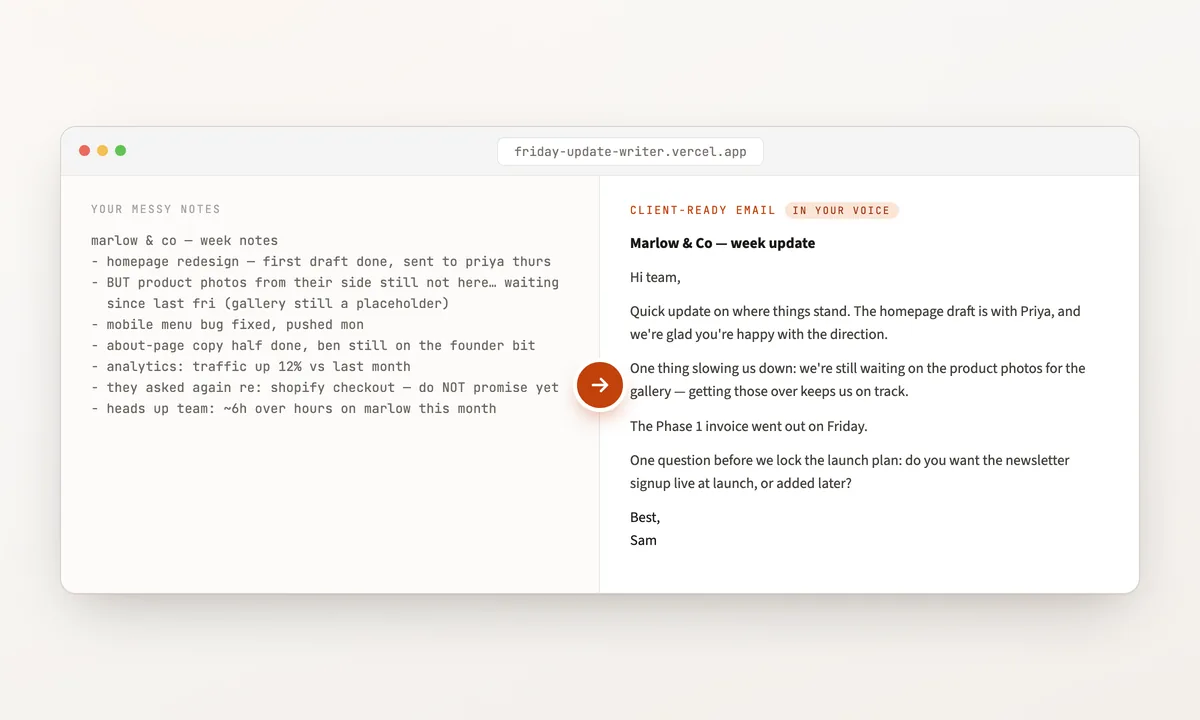
Your first guided build: rough weekly notes in, a client-ready update out.
The problem
Your team already knows where the work gets stuck: the same notes rewritten for every client, the same handoff cleaned up twice, the same report rebuilt from scratch, the same useful little tool waiting behind more urgent client work. Generic software rarely matches the way your agency actually works, and hiring a developer for every small improvement makes no commercial sense. The gap is no longer ideas. It is being able to turn one recurring team job into something your team can open and use.
The path
This guide walks you through building one useful app from beginning to end, with the Friday Update Writer as your guided project. You explain what good looks like, let Claude build it, test it with real examples, and put it online for your team. Your role is the same one you already play inside the agency — set the standard, judge the work, approve changes, and decide what the team needs. By Sunday, you have finished the whole journey yourself and know how to approach the next useful tool your team has been waiting for.
Why I can teach this
I built this guide from the same approach I use in real client work: taking one frustrating, repetitive job and turning it into something useful the team can actually use. I start small, make sure it works in the real world, and only then build more around it. The Friday Update Writer is your first guided project—not because it is the biggest idea, but because finishing something real changes what you believe you can build next.
What's actually at stake
Every recurring bottleneck keeps taking your team’s time until someone turns it into something better. This is not about automating the craft your clients pay for. It is about removing the frustrating work around that craft — the handoffs, preparation, reporting, and repeated jobs that slow good people down.
By Sunday you have one app live, the satisfaction of finishing it yourself, and a clearer sense of what your team could build next.
Start with one small win. Leave knowing you can do it again.
- Try the finished Friday Update Writer. Rough weekly notes go in; a client-ready update comes out. This is what you build as you move from a rough idea to a live tool your team can open. There is no login on this starter app, so use sample or non-sensitive notes unless you later add access controls. Open the live app →
- This same approach already works in real client businesses. I’ve used it to build a content-research system for a social media agency, a creative pipeline for commercial production, and operational software for a B2B service business.
- Where the guide stops. You finish one small app with one clear job. Tools that need logins, databases, several connected services, or larger automations take more work beyond this guide.
From a reader who completed the guide
The book shows you, step by step, how to build your own web app with Claude and Claude Code — no prior knowledge needed. Everything is hands-on, and I’m using what I learned directly in my own projects. If you want to get from an idea to a finished, live app, this has everything you need.
 Elvis Z. Business Owner
 $7 · Instant access · PDF + Notion · Yours to keep
What you leave with
- A working Friday Update Writer at a live URL under your own accounts.
- The source files, prompts, and decisions that took it from a recurring agency job to something your team can use.
- The complete path from idea to ownership: job → describe → build → check → share → own.
- A practical recovery process for reviewing output, correcting mistakes, and approving changes without writing the code yourself.
- A repeatable way to approach the next useful tool your team has been waiting for.
- The PDF guide and Notion workbook for repeating the process with your next focused build.
What you can build from here
The Friday Update Writer is your first build. From there, you can look for other small tools with one clear input, one recurring team job, and one useful output.
This weekend
- Take the Friday Update Writer from an empty folder to a live URL.
- Keep the source files and live app under your own accounts.
- Finish the whole journey once: choose the job, describe it, build it, check it, share it, and own it.
Your next useful team tool
- A proposal drafter that turns discovery notes into a structured first draft.
- A reporting assistant that turns monthly metrics into a consistent review draft.
- A hook-sheet generator built around your agency’s own examples and standards.
- A shot-list generator that turns an approved script into a production starting point.
These are small tools with one clear job—not a promise that one weekend replaces the work required for larger connected systems.
48-hour build guarantee
Within 7 days of purchase, choose a 48-hour build period and complete the guide. If you do not finish with a functioning Friday Update Writer at a live URL, reply to your receipt email before those 7 days end and I’ll refund your $7. No form to fill out.
Common questions
What will I actually be able to build afterward?
You will understand how to take another focused internal tool from idea to a useful first version: define what goes in and what should come out, have Claude build it, test it, put it online, and keep control of the source. Larger systems involving accounts, databases, or several connected services require additional development.
What do I need before I start?
A Mac or Windows computer. Claude Code Desktop requires a paid Claude plan, and the app requires a separate pay-as-you-go Anthropic API account with credit.
What do I own when I finish?
The app’s source files and live version stay under your own accounts. You also keep the guide, workbook, prompts, and the steps you used to build it.
Can my team use the app?
Yes. The starter app is published to a live URL your team can open. It is not an authenticated client portal, so use sample or non-sensitive inputs unless you later add access controls.
What if I get stuck?
The guide includes checkpoints, screenshots, and a recovery process for the common failures that appeared during the real build. Each checkpoint shows the expected result and the recovery section covers what to inspect when your result differs.
How does the 48-hour guarantee work?
Within 7 days of purchase, choose and complete a 48-hour build period. The complete eligibility terms are stated directly above this FAQ.
$7 · Instant access · PDF + Notion · Yours to keep
“If you want to get from an idea to a finished, live app, this has everything you need.” — Elvis Z.